
Hi!
There is a fatal flaw in your interface design, and I have just fallen for it for the second time, wasting about an hour of my work. Luckily, it was only an hour this time, but the situation is stressful—I live in fear that one day, I might accidentally delete a folder with many important Kahoots due to this design flaw.
I selected a few Kahoots to delete and clicked the three dots in the corner, but instead of deleting the selected Kahoots, the option deletes the entire folder. This is extremely counterintuitive.
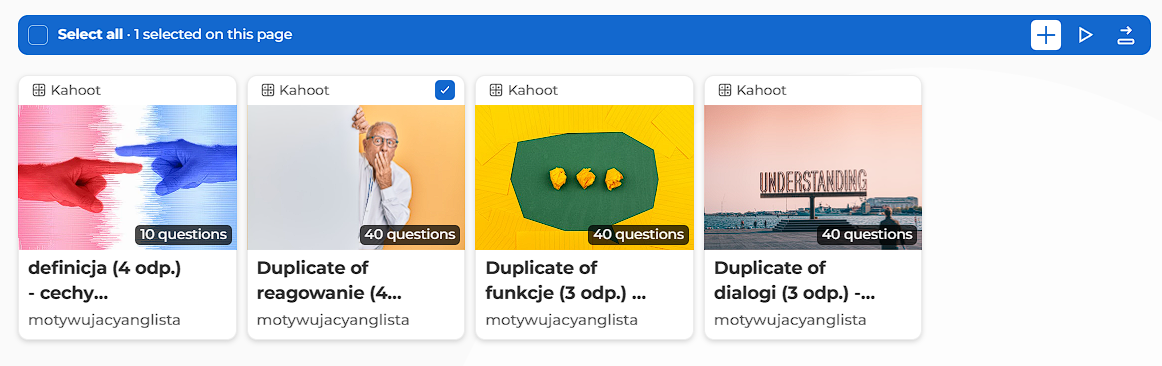
I think an easy way to fix it would be to add a delete icon in the blue pane that appears after selecting a Kahoot. The icon should be next to the other icons.
This way, users wouldn’t mistakenly assume that they need to click on the menu (three dots) to delete a Kahoot. Currently, if you're in a hurry, you might easily forget that the three dots delete a folder instead of the selected Kahoots, potentially losing many hours of work in an instant.
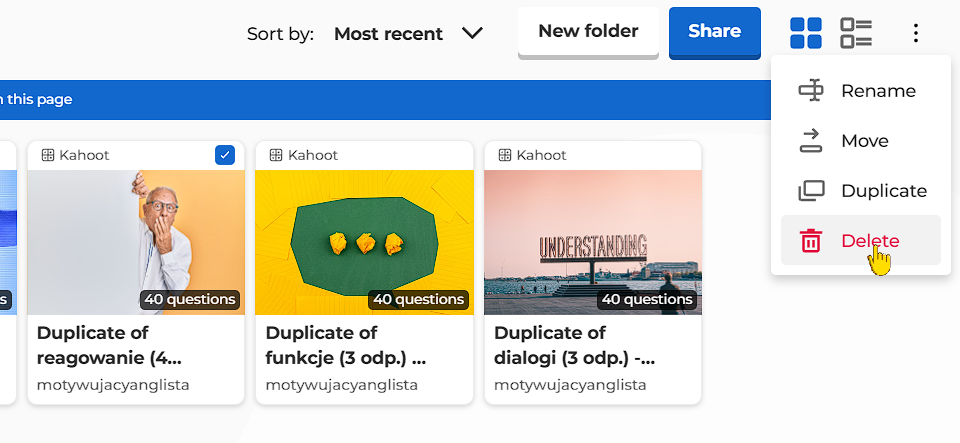
The problems wouldn’t be as significant if there were a trash bin. Last time, I lost two important Kahoots because of this, and it took about a week to recover them! If I hadn’t known their exact names and had a link to them, I wouldn’t most likely have been able to get them back.
Take action to fix this please, as this situation is completely unacceptable.
Have a nice day
Tomasz
1 comentário
Thank you very much for your suggestion. Unfortunately, this feature isn't currently available.
We're constantly working on improving our product thus we value greatly our users' feedback regarding Kahoot!. There's nothing more motivating for us than hearing your ideas.
I will forward your feedback to the appropriate department for consideration.
Por favor, entrar para comentar.