Read aloud - app feature
Who can use read aloud?
Everyone! It’s available for free for all account types.
Read aloud is a mobile app feature that can be enabled on player's device after joining a kahoot game.
How to enable the read aloud game option
- Open a kahoot in our mobile app, tap Study and choose one of our study modes. Or accept an assignment that was shared with you by a friend or a teacher.
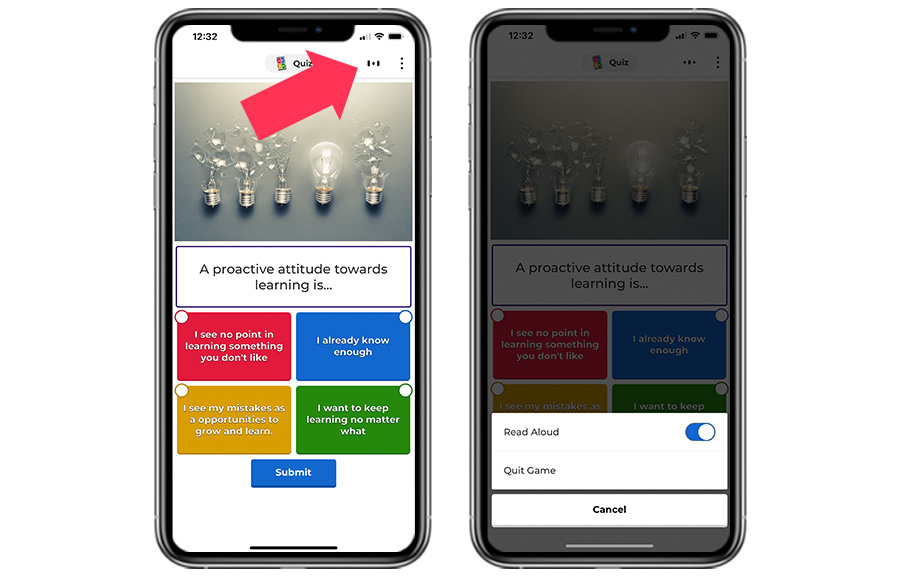
- Once you’ve started playing, tap the read aloud icon in the top right corner of the screen.
- The app will first read aloud the question and then switch to the screen with answer alternatives and read them aloud. Answer alternatives will be visually highlighted as they’re being read out.
💡 Found this helpful? Subscribe to our Youtube channel for more tips and Kahoot! tutorials!
2 comments
Excelente , como hago para editar preguntas ?
Hello alexahernandez1709!
If you want to edit questions in an existing Kahoot, log in to your Kahoot! account and go to Library. Find the quiz you want to edit, then click the three dots next to its title to open the dropdown menu. Choose Edit from the list (see the screenshot below). Then navigate to the specific question that you would like to edit.
Please sign in to leave a comment.